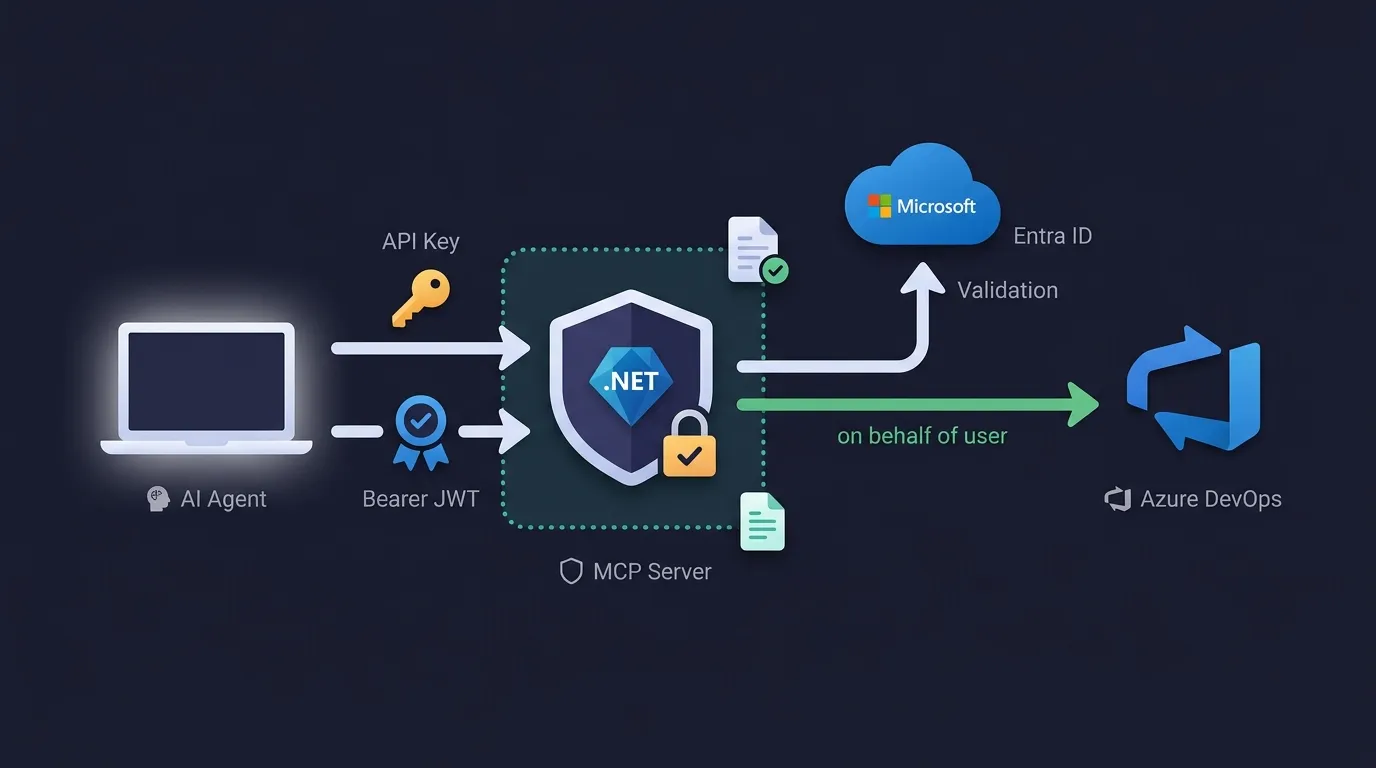
Securing .NET MCP Servers: API Keys, Microsoft Entra ID, and Agent Governance
A tour of a real .NET Aspire MCP server repo — API key auth, scope- and role-based Entra ID authorization per tool, an on-behalf-of downstream API call, and policy-driven agent governance.
What we are talking about
In May 2026 I had the opportunity and honor to speak at the European AI & Cloud Summit in Cologne. The talk was about building secure MCP servers with .NET and C#, and integrating them into Copilot Studio using built-in authorization with Microsoft Entra ID. In this post I want to focus on creating secure MCP servers and client integration is up to you.
MCP servers aren't read-only APIs. A tool call can create a work item, push a commit, or call a downstream API on someone's behalf. The moment your server acts on someone's behalf, "is the caller authenticated?" stops being enough — you need to know who is calling and what they're allowed to do, tool by tool. This post walks through a real repo that shows two authentication models — API key and Microsoft Entra ID — plus a governance layer that blocks, sanitizes, and audits tool calls on top of either.
Background: what is MCP?
The Model Context Protocol is an open standard (modelcontextprotocol.io) that lets:
- AI agents (GitHub Copilot, Claude via API, or custom agents) discover and invoke tools exposed by a server.
- Servers define what tools are available (name, description, parameters) and execute them on behalf of callers.
- Agents talk to servers over a JSON-RPC transport, usually stateless HTTP, without maintaining a persistent session.
Think of MCP as a bridge: instead of hardcoding API integrations into an LLM, you write an MCP server that exposes your APIs, then point the agent at that server. The agent learns what tools exist, calls them, and gets results back.
The security challenge
Before an MCP server goes anywhere near production, you have to answer:
- How do I authenticate callers? Is this caller allowed to talk to this MCP server at all?
- What authorization rules apply? Does this caller have permission to call this specific tool?
- How do I prevent abuse? Can malicious or prompt-injection attempts be blocked at the tool level?
The reference repo for this post demonstrates two concrete authentication patterns and one governance pattern:
| Pattern | Use case | What it shows |
|---|---|---|
| API key | Internal demos, service-to-service, quick prototypes | Simple, stateless auth with constant-time comparison, wired into the standard ASP.NET Core auth pipeline. |
| Microsoft Entra ID (OAuth/JWT) | Enterprise production scenarios, SaaS, federated identity, role-based access | Token validation, scope-based authorization, role-based policies, on-behalf-of downstream API calls. |
| Agent governance | Safe AI execution, policy-driven tool blocking, audit/compliance | Declarative deny/allow rules, prompt-injection detection, response sanitization, audit trails. |
A real-world scenario
You're building an AI agent for your organization. It needs to call internal APIs — project management, billing, DevOps. Your security team requires: only authenticated users get in, only certain roles can call certain tools, every invocation is audited, and prompt-injection attempts get detected and blocked. You expose those APIs via an MCP server; users authenticate with their existing Entra ID credentials, the server validates the token, checks roles/scopes, enforces policy, and logs every call. If a malicious prompt tries to invoke a blocked tool, governance denies it and records the attempt.
What the sample repo provides
The code for this post lives in hluxenhofer/ecs2026-mcp-server — a conference-demo repo, "documentation/demo-only", not intended for active feature development. It's a .NET 10 Aspire solution with two small MCP servers running side by side:
-
ECS2026.MCP.ApiKey— auth the simple way.- Custom authentication handler validating an
X-Api-Keyheader, with constant-time comparison so key validity can't leak through timing. - Produces a proper ASP.NET Core
ClaimsPrincipal, so logging and audit work downstream like any other authenticated request. - One tool:
echo. - Good for: internal/demo scenarios, or as a stepping stone before OAuth.
- Custom authentication handler validating an
-
ECS2026.MCP.EntraID— production-shaped authentication.- Uses Microsoft.Identity.Web for JWT validation against an Entra ID tenant.
- Combines scope-based (
mcp.tools,joke.tell,devops.read) and role-based (Default,Admin) authorization on the same tokens. - Calls Azure DevOps on behalf of the signed-in user (on-behalf-of flow) from one of its tools.
- Layers Microsoft.AgentGovernance on top: declarative deny rules, prompt-injection detection, response sanitization, audit.
- Five tools:
who_am_iand its admin-gated variantwho_am_i_as_admin(two flavors of the same identity tool), plusdo_blocked_action(governance demo target),tell_joke(calls an external joke API), andlist_projects(calls Azure DevOps on behalf of the user).
Both servers run under a shared ECS2026.MCP.AppHost (.NET Aspire orchestrator, with a dev tunnel per server) and a ECS2026.MCP.ServiceDefaults project providing shared OpenTelemetry, health checks, and resilient HttpClient defaults.
Since the repo isn't under active development, the bare URL above may drift from what's described here over time — check the repo's latest state (or a tag, if one exists) if you want to line up exactly with what this walkthrough refers to.
The implementation is intentionally compact — built for a 45-minute conference slot — but the patterns are production-shaped, not toy examples. The rest of this post walks through both servers, the governance layer, and how to test each of them.
Get started (5 minutes)
Prerequisites: .NET 10 SDK, Git. Optional: an Azure subscription for the Entra ID scenario.
git clone https://github.com/hluxenhofer/ecs2026-mcp-server.git
cd ecs2026-mcp-server
dotnet restore
dotnet build
Configure secrets (pick one or both scenarios):
API key mode — edit src/ECS2026.MCP.ApiKey/appsettings.json:
{
  "Authentication": { "ApiKey": "Test1234!" }
}
Entra ID mode — edit src/ECS2026.MCP.EntraID/appsettings.json:
{
  "AzureAd": {
    "Instance": "https://login.microsoftonline.com/",
    "Domain": "your-tenant.onmicrosoft.com",
    "TenantId": "your-tenant-id",
    "ClientId": "your-app-client-id",
    "ClientCredentials": [
      { "SourceType": "ClientSecret", "ClientSecret": "your-app-secret" }
    ]
  }
}
(The Azure DevOps downstream-call configuration is covered later, once that tool is introduced.)
Run both servers via Aspire:
dotnet run --project src/ECS2026.MCP.AppHost/ECS2026.MCP.AppHost.csprojWhat's inside
ECS2026.MCP.ApiKey— MCP server protected by a customX-Api-Keyheader handler with constant-time comparison.ECS2026.MCP.EntraID— MCP server with Entra ID JWT validation, scope/role authorization, an Azure DevOps downstream call, and agent governance.ECS2026.MCP.AppHost— Aspire orchestrator launching both servers with separate dev tunnels.ECS2026.MCP.ServiceDefaults— shared telemetry, health checks, resilience.
Why a custom API key handler, not a string comparison
ApiKeyAuthenticationHandler (src/ECS2026.MCP.ApiKey/Authentication/ApiKeyAuthenticationHandler.cs) exists instead of a one-line if (header == secret) check for a few reasons:
- Constant-time comparison — uses
CryptographicOperations.FixedTimeEqualsso the comparison's duration can't leak whether the key was close to correct. - Strict parsing — rejects missing or duplicated header values instead of guessing which one to use.
- ASP.NET Core integration — produces a real
AuthenticationTicketandClaimsPrincipal, so standard logging,[Authorize], and audit trails all work downstream exactly like they would for any other auth scheme. - Testable and extensible — a single class you can unit test, or extend with throttling/rotation/auditing.
- Configuration-driven — the secret comes from config (user-secrets, environment variables, a secret store), so rotation is an environment change, not a code change.
A naive string comparison is vulnerable to timing attacks, bypasses the ASP.NET Core auth pipeline entirely (no ClaimsPrincipal, no integration with logging/authorization), and is harder to test or extend.
Entra ID: authentication stack
Program.cs (src/ECS2026.MCP.EntraID/Program.cs) registers two authentication schemes with two different jobs, chained onto a single AddAuthentication() call:
using Microsoft.AspNetCore.Authentication.JwtBearer;
using Microsoft.Identity.Web;
using ModelContextProtocol.AspNetCore.Authentication;

var scopeName = "mcp.tools";
var settings = new Settings();
builder.Configuration.Bind(settings);

builder.Services.AddAuthentication(options =>
{
    // MCP auth is used for protocol challenge, while JWT bearer validates the actual access token.
    options.DefaultChallengeScheme = McpAuthenticationDefaults.AuthenticationScheme;
    options.DefaultAuthenticateScheme = JwtBearerDefaults.AuthenticationScheme;
})
    .AddMcp(options =>
    {
        options.ResourceMetadata = new()
        {
            AuthorizationServers = { settings.AzureAd!.Authority },
            ScopesSupported =
            [
                $"api://{settings.AzureAd.ClientId}/{scopeName}",
                $"api://{settings.AzureAd.ClientId}/joke.tell",
                $"api://{settings.AzureAd.ClientId}/devops.read",
            ],
        };
    })
    .AddMicrosoftIdentityWebApi(builder.Configuration)
    .EnableTokenAcquisitionToCallDownstreamApi()
    .AddDownstreamApi("AzureDevOps", builder.Configuration.GetSection("DownstreamApis:AzureDevOps"))
    .AddInMemoryTokenCaches();
Per the MCP authorization spec, a server never issues tokens itself — it's an OAuth 2.1 resource server, validating bearer tokens minted by Entra ID, and publishing RFC 9728 Protected Resource Metadata at /.well-known/oauth-protected-resource so clients discover which authorization server and scopes to use.
McpAuthenticationDefaults.AuthenticationScheme, registered by.AddMcp(...), is the default challenge scheme. It's responsible for the OAuth protocol mechanics an MCP client expects: publishing the RFC 9728 metadata document and shaping theWWW-Authenticatechallenge on a401.JwtBearerDefaults.AuthenticationScheme, registered by.AddMicrosoftIdentityWebApi(...), is the default authenticate scheme. It validates the incoming bearer token — signing keys, issuer, audience, expiry — via standard Microsoft.Identity.Web machinery.
The rest of the chain — EnableTokenAcquisitionToCallDownstreamApi(), AddDownstreamApi("AzureDevOps", ...), AddInMemoryTokenCaches() — registers on-behalf-of token acquisition for Azure DevOps, used later by the list_projects tool.
Settings is a small POCO bound from configuration:
// Settings.cs
public class Settings
{
    public AzureAd? AzureAd { get; set; }
}

public class AzureAd
{
    public required string ClientId { get; set; }
    public required string TenantId { get; set; }
    public string Authority => $"https://login.microsoftonline.com/{TenantId}/v2.0";
}
The repo targets .NET 10 and pins stable, non-preview package versions: ModelContextProtocol.AspNetCore 1.4.1, Microsoft.Identity.Web and Microsoft.Identity.Web.DownstreamApi 4.13.2.
Entra ID app registration: scopes and app roles
In the Entra ID app registration backing the MCP server, you configure two independent things:
Scopes (delegated permissions) — under Expose an API:
- Set an Application ID URI, e.g.
api://<client-id>. - Add scopes:
mcp.tools,joke.tell,devops.read, with admin or user consent as appropriate. - Once a client requests and a user consents to them, they land in the access token as
"scp": "mcp.tools joke.tell devops.read"(space-separated).
App roles — under App roles (the app roles manifest):
- Add app roles:
DefaultandAdmin. - Set Allowed member types to include Users/Groups, not only Applications, if you want roles assignable directly to people.
- In Enterprise Applications → Users and groups, assign the role to a user or group. That user's next delegated token carries
"roles": ["Default"]alongside whateverscpclaims it also has.
App roles can also be granted to a service principal as an application permission for client-credentials tokens — that path is real too. The point is it's not the only path: the same claim type shows up on delegated tokens whenever a user has been directly assigned a role.
A scope is requested per-token and consented to — narrow, specific to one capability. An app role is a broader, closer-to-static grant, provisioned ahead of time by an admin rather than negotiated at token-request time — whether assigned to a user directly or to a service principal for app-only calls. Requiring both on the same token, as the baseline policy below does, gives you two independent checks: "did this call ask for this specific capability" and "is this identity provisioned for this application at all."
Once the app registration is ready, create a client secret under Certificates & secrets and store it securely rather than in appsettings.json:
dotnet user-secrets set "AzureAd:ClientCredentials:0:ClientSecret" "your-secret" --project src/ECS2026.MCP.EntraIDThe route-level gate
Before touching individual tools, put a coarse gate on the whole MCP endpoint. In the repo, this is the UseMCP policy — and it requires a scope and a role and an authenticated user, all three together:
builder.Services.AddAuthorization(options =>
{
    options.AddPolicy("UseMCP", policy =>
    {
        policy.AddAuthenticationSchemes(McpAuthenticationDefaults.AuthenticationScheme, JwtBearerDefaults.AuthenticationScheme);
        policy.Requirements.Add(new ScopeAuthorizationRequirement(new[] { "mcp.tools" }));
        policy.RequireRole("Default", "Admin");
        policy.RequireAuthenticatedUser();
    });
});

var app = builder.Build();

app.MapMcp().RequireAuthorization("UseMCP");
Read that policy carefully — it's "scope and role," not "scope or role." Every caller has to present a token that both requested the mcp.tools scope and carries an assigned Default or Admin app role. AddAuthenticationSchemes(Mcp, JwtBearer) ties the policy to both schemes registered earlier, so both the MCP challenge behavior and the actual JWT claim validation participate in evaluating it.
Most write-ups on Entra ID-protected APIs that serve both delegated and app-only callers land on an either/or check — scope OR role — because a delegated (user) token carries scp (and usually no roles, unless separately assigned), while an app-only, client-credentials token carries roles but never scp — there's no user to delegate on behalf of. Requiring scope and role together, as UseMCP does here, is a stricter, deliberate defense-in-depth choice: the client must be consented (scope) and the calling user must be explicitly role-assigned by an admin (role). One direct consequence: since app-only tokens never carry scp, this policy shape structurally excludes pure service-principal callers — only delegated user tokens can ever satisfy it. That's a deliberate choice to keep this MCP endpoint delegated-user-only, not a generic template for every Entra ID-protected API.
app.MapMcp() maps the MCP endpoint at the app's root path by default — there's no /mcp segment unless you ask for one with app.MapMcp("/mcp"). The repo keeps the default, so every request in the testing section below targets /.
This is the coarse baseline. Fine-grained, per-tool checks happen one layer in.
Per-tool authorization with AddAuthorizationFilters()
The SDK lets you decorate [McpServerTool] methods (or their containing [McpServerToolType] class) with plain ASP.NET Core [Authorize] attributes, wired into MCP tool dispatch via AddAuthorizationFilters(). It uses the same IAuthorizationService and ClaimsPrincipal as any other ASP.NET Core authorization check — it is not an MVC action filter.
Three more named policies sit alongside UseMCP:
options.AddPolicy("TellJokes", policy =>
{
    policy.AddAuthenticationSchemes(McpAuthenticationDefaults.AuthenticationScheme, JwtBearerDefaults.AuthenticationScheme);
    policy.Requirements.Add(new ScopeAuthorizationRequirement(new[] { "joke.tell" }));
    policy.RequireAuthenticatedUser();
});

options.AddPolicy("AzureDevOps", policy =>
{
    policy.AddAuthenticationSchemes(McpAuthenticationDefaults.AuthenticationScheme, JwtBearerDefaults.AuthenticationScheme);
    policy.Requirements.Add(new ScopeAuthorizationRequirement(new[] { "devops.read" }));
    policy.RequireAuthenticatedUser();
});

options.AddPolicy("AdminOnly", policy =>
{
    policy.AddAuthenticationSchemes(McpAuthenticationDefaults.AuthenticationScheme, JwtBearerDefaults.AuthenticationScheme);
    policy.RequireRole("Admin");
});
Tools are registered with AddAuthorizationFilters() chained onto the MCP server builder:
builder.Services.AddHttpContextAccessor();
builder.Services.AddMcpServer()
    .WithTools<WhoAmITool>()
    .WithTools<JokeTool>()
    .WithTools<AzureDevOpsTool>()
    .WithHttpTransport(options =>
    {
        // Stateless mode is recommended for servers that don't need server-to-client
        // requests like sampling or elicitation. It enables horizontal scaling without
        // session affinity and works with clients that don't send Mcp-Session-Id.
        options.Stateless = true;
    })
    .AddAuthorizationFilters();
JokeTool gates its only tool at the class level:
// Tools/JokeTool.cs
using System.ComponentModel;
using System.Text.Json;
using Microsoft.AspNetCore.Authorization;
using ModelContextProtocol.Server;

[Authorize(Policy = "TellJokes")]
[McpServerToolType]
public class JokeTool
{
    private readonly IHttpClientFactory _httpClientFactory;

    public JokeTool(IHttpClientFactory httpClientFactory) => _httpClientFactory = httpClientFactory;

    [McpServerTool, Description("Tells a joke to the client.")]
    public async Task<string> TellJoke()
    {
        var client = _httpClientFactory.CreateClient("JokeClient");
        var response = await client.GetAsync("/jokes/random");
        response.EnsureSuccessStatusCode();

        var json = await response.Content.ReadAsStringAsync();
        using var document = JsonDocument.Parse(json);
        return document.RootElement.GetProperty("value").GetString() ?? string.Empty;
    }
}
JokeClient is a named HttpClient registered once in Program.cs, pointed at the Chuck Norris joke API:
builder.Services.AddHttpClient("JokeClient", client =>
{
    client.BaseAddress = new Uri("https://api.chucknorris.io");
});
WhoAmITool shows both "no attribute at all" and a method-level policy in the same class:
// Tools/WhoAmITool.cs
using System.ComponentModel;
using System.Security.Claims;
using Microsoft.AspNetCore.Authorization;
using ModelContextProtocol.Server;

[McpServerToolType]
public sealed class WhoAmITool
{
    private readonly IHttpContextAccessor _httpContextAccessor;

    public WhoAmITool(IHttpContextAccessor httpContextAccessor) => _httpContextAccessor = httpContextAccessor;

    // No [Authorize] attribute — this tool relies entirely on the
    // route-level "UseMCP" policy that already gates every request.
    [McpServerTool, Description("Returns information about the current user.")]
    public string WhoAmI()
    {
        // This is only used for debug purposes to show the raw bearer token in the request header.
        var authorizationHeader = _httpContextAccessor.HttpContext?.Request.Headers.Authorization.ToString();
        string? bearerToken = null;
        if (!string.IsNullOrWhiteSpace(authorizationHeader) &&
            authorizationHeader.StartsWith("Bearer ", StringComparison.OrdinalIgnoreCase))
        {
            bearerToken = authorizationHeader["Bearer ".Length..].Trim();
        }

        ClaimsPrincipal? user = _httpContextAccessor.HttpContext?.User;
        return $"Hello {user?.Identity?.Name}. Welcome to ECS 2026!";
    }

    [Authorize(Policy = "AdminOnly")]
    [McpServerTool, Description("Returns admin information about the current user.")]
    public string WhoAmIAsAdmin()
    {
        ClaimsPrincipal? user = _httpContextAccessor.HttpContext?.User;
        return $"Hello Admin {user?.Identity?.Name}. Welcome to ECS 2026!";
    }
}
Worth flagging: the bearerToken local variable extracted in WhoAmI() above is never actually used elsewhere in the method — only user?.Identity?.Name makes it into the response — so don't go looking for a second use you missed, it is only for debugging purposes.
The real class also has a third method, DoBlockedAction, with no [Authorize] attribute either — not an oversight, but a demonstration of the governance layer's own enforcement mechanism (declarative deny rules), covered later.
[RequiredScopeOrAppPermission] silently does nothing on an MCP tool. It's metadata, and Microsoft.Identity.Web's handler looks it up via HttpContext.GetEndpoint()?.Metadata — but every tool call routes through the same MapMcp() endpoint, so your per-tool attribute is never in that metadata.
[Authorize(Policy = "...")] does work: it carries only a policy name, which the MCP dispatcher reads off the method and evaluates through IAuthorizationService against the caller's ClaimsPrincipal. No endpoint involved.
The rule: attributes whose handlers read endpoint metadata won't work on tools. Named policies will. Need scope-or-app-permission semantics? Write a requirement that inspects the scp and roles claims directly, register it as a policy, and apply it with [Authorize].
On-behalf-of: calling a downstream API as the caller
AzureDevOpsTool.ListProjects doesn't just check a policy and return static data — it calls Azure DevOps as the signed-in user, using the on-behalf-of token acquisition wired up back in Program.cs:
// Tools/AzureDevOpsTool.cs
using System.ComponentModel;
using Microsoft.AspNetCore.Authorization;
using Microsoft.Identity.Abstractions;
using ModelContextProtocol.Server;

[McpServerToolType]
public class AzureDevOpsTool
{
    private readonly ILogger<AzureDevOpsTool> _logger;
    private readonly IDownstreamApi _downstreamApi;

    public AzureDevOpsTool(ILogger<AzureDevOpsTool> logger, IDownstreamApi downstreamApi)
    {
        _logger = logger;
        _downstreamApi = downstreamApi;
    }

    [Authorize(Policy = "AzureDevOps")]
    [McpServerTool, Description("List all Azure DevOps projects by organization name")]
    public async Task<ToolResponse<string>> ListProjects([Description("Organization name in Azure DevOps")] string orgName)
    {
        try
        {
            var response = await _downstreamApi.CallApiForUserAsync(
                "AzureDevOps",
                options => options.RelativePath = $"{orgName}/_apis/projects");

            response.EnsureSuccessStatusCode();
            var result = await response.Content.ReadAsStringAsync();

            return ToolResponse<string>.Ok(result);
        }
        catch (Exception ex)
        {
            // Return a structured tool error so MCP clients can display failures consistently.
            _logger.LogError(ex, "Failed to list projects for organization {OrgName}", orgName);
            return ToolResponse<string>.Fail(ex.Message);
        }
    }
}
CallApiForUserAsync performs an OAuth2 on-behalf-of exchange: Microsoft.Identity.Web silently swaps the token the caller sent to this MCP server for a new token scoped to Azure DevOps (the .default scope configured under DownstreamApis:AzureDevOps:Scopes), caches it, and attaches it to the outgoing request — the tool code never touches a token directly. The call to Azure DevOps happens as the signed-in user, subject to whatever projects that user can actually see there. That's why devops.read is a scope requirement, not just an app role: the user is consenting to let this server act on their behalf against a specific downstream API.
// appsettings.json
{
  "DownstreamApis": {
    "AzureDevOps": {
      "BaseUrl": "https://dev.azure.com",
      "Scopes": ["499b84ac-1321-427f-aa17-267ca6975798/.default"]
    }
  }
}
The response envelope is a small, shared type used by every tool that can fail in an expected way (bad org name, downstream 404, timeout), so MCP clients get a consistent success/data/error shape regardless of which tool they called:
// Models/ToolResponse.cs
public class ToolResponse<T>
{
    public bool Success { get; set; }
    public T? Data { get; set; }
    public string? Error { get; set; }

    public static ToolResponse<T> Ok(T data) => new() { Success = true, Data = data };
    public static ToolResponse<T> Fail(string error) => new() { Success = false, Error = error };
}
What happens when a check fails
An unauthorized tool call doesn't come back as an HTTP 401/403 — by the time tool dispatch runs, the transport may already be committed to a 200 JSON-RPC response. Instead, the SDK throws an McpException with an "Access forbidden" message, surfaced as a JSON-RPC error object in the response body. Callers need to check the JSON-RPC error, not the HTTP status code, to detect an authorization failure on a tools/call.
tools/list behaves differently: it doesn't error for a caller lacking permission on some tools, it silently filters the list down to what that caller can actually invoke. A user whose token only satisfies UseMCP and joke.tell sees who_am_i and tell_joke, but not who_am_i_as_admin or list_projects.
Agent governance - what gets protected
The repo layers Microsoft.AgentGovernance / Microsoft.AgentGovernance.Extensions.ModelContextProtocol — the Agent Governance Toolkit — on top of everything above, via AddAuthorizationFilters() and .WithGovernance(...) on the same MCP server builder:
builder.Services.AddMcpServer()
    .WithTools<WhoAmITool>()
    .WithTools<JokeTool>()
    .WithTools<AzureDevOpsTool>()
    .WithHttpTransport(options => { options.Stateless = true; })
    .AddAuthorizationFilters()
    .WithGovernance(options =>
    {
        options.PolicyPaths.Add("policies/mcp.yaml");
        options.ServerName = "mcp-server";
        options.ScanToolsOnStartup = true;
        options.FailOnUnsafeTools = true;
        options.SanitizeResponses = true;
        options.GovernFallbackHandlers = true;
        options.EnablePromptInjectionDetection = true;
        options.EnableMetrics = true;
        options.EnableAudit = true;
});| Feature | Effect |
|---|---|
Policy file (Policies/mcp.yaml) | Declarative deny/allow rules evaluated at runtime — e.g. deny do_blocked_action for a specific agent identity. |
Scan on startup (ScanToolsOnStartup, FailOnUnsafeTools) | The server fails to start if a registered tool violates policy expectations, instead of silently exposing it. |
| Response sanitization | SanitizeResponses strips sensitive data from tool outputs per policy. |
| Fallback handlers | GovernFallbackHandlers applies governance to whatever fallback behavior runs when a tool is blocked or sanitized. |
| Prompt-injection detection | EnablePromptInjectionDetection flags suspicious input patterns. |
| Audit & metrics | EnableAudit / EnableMetrics emit telemetry and audit trails via OpenTelemetry. |
The policy file itself is plain YAML:
# Policies/mcp.yaml
apiVersion: governance.toolkit/v1
version: "1.0"
name: test-policy
default_action: allow
rules:
  - name: deny-Test-do_blocked_action
    condition: "tool_name == 'do_blocked_action' and agent_did == 'did:mesh:Test'"
    action: deny
    priority: 10
  - name: deny-agent-do_blocked_action
    condition: "tool_name == 'do_blocked_action' and agent_did == 'did:mesh:7a10bce4-3312-496a-a2e6-00f4a5cddf48'"
    action: deny
    priority: 10
The agent_did the rule matches against comes from an optional agent-id request header, mapped onto an agent_id claim (did:mesh:{value}) inside the JWT bearer token-validated event — a caller-supplied identity that governance rules can key off of independently of the Entra ID token's own claims.
When a request carries header agent-id: Test and calls do_blocked_action: the server maps the header to agent_id = did:mesh:Test, evaluates the policy rule, denies the call, sanitizes the response, and records an audit event.
Extracting header value for agent-id is only for showcasing the ability to govern agents identified by specific id.
For production-grade code I would strongly recommend to create own agent identities or use Microsoft Entra Agent ID
This is a genuinely separate concern from the Entra ID authorization covered above — a policy engine sitting alongside [Authorize], not a replacement for it. Both can (and here, do) protect the same server at once.
Testing: API key
File: src/ECS2026.MCP.ApiKey/ECS2026.MCP.ApiKey.http (open in VS Code's REST Client, or paste into Postman).
List tools:
POST http://localhost:5238/
X-Api-Key: Test1234!
Accept: application/json, text/event-stream
Content-Type: application/json

{"method":"tools/list","params":{"_meta":{"progressToken":3}},"jsonrpc":"2.0","id":1}
Call the echo tool:
POST http://localhost:5238/
X-Api-Key: Test1234!
Accept: application/json, text/event-stream
Content-Type: application/json

{"method":"tools/call","params":{"name":"echo","arguments":{"message":"test"},"_meta":{"progressToken":4}},"jsonrpc":"2.0","id":2}
Testing: Entra ID
MCP tool names are exposed on the wire as snake_case, regardless of the C# method name — the SDK converts them automatically. WhoAmI becomes who_am_i, WhoAmIAsAdmin becomes who_am_i_as_admin, TellJoke becomes tell_joke, ListProjects becomes list_projects, DoBlockedAction becomes do_blocked_action. Get this wrong in a request body and you'll get a "tool not found" error, not an authorization one.
1. Get a delegated user token
UseMCP requires the mcp.tools scope together with an assigned Default or Admin app role. A client-credentials (app-only) token won't satisfy it — app-only tokens never carry an scp claim, since there's no user to delegate on behalf of. You need a delegated user token, from a user who has been assigned one of those app roles. The device code grant is a convenient way to get one from the command line:
# 1. Request a device code
curl -X POST "https://login.microsoftonline.com/{TENANT_ID}/oauth2/v2.0/devicecode" \
  -d "client_id={SERVER_CLIENT_ID}&scope=api://{SERVER_CLIENT_ID}/mcp.tools offline_access"

# Follow the printed verification URL, sign in as a user who has been
# assigned the "Default" or "Admin" app role, and enter the displayed code.

# 2. Poll for the token once sign-in is complete
curl -X POST "https://login.microsoftonline.com/{TENANT_ID}/oauth2/v2.0/token" \
-d "grant_type=urn:ietf:params:oauth:grant-type:device_code&client_id={SERVER_CLIENT_ID}&device_code={DEVICE_CODE}"App registration requires "Allow public client flows" = Yes; otherwise, the device code flow will fail with error AADSTS7000218.
Record the access_token value from the response.
2. List tools
curl -X POST "https://{HOST}/" \
  -H "Authorization: Bearer {ACCESS_TOKEN}" \
  -H "Accept: application/json, text/event-stream" \
  -H "Content-Type: application/json" \
  -d '{"method":"tools/list","params":{"_meta":{"progressToken":1}},"jsonrpc":"2.0","id":1}'
Only tools the token's scopes/roles satisfy will appear in the result.
3. Call the who_am_i tool
A token satisfying only the baseline UseMCP policy is enough:
curl -X POST "https://{HOST}/" \
  -H "Authorization: Bearer {ACCESS_TOKEN}" \
  -H "Accept: application/json, text/event-stream" \
  -H "Content-Type: application/json" \
  -d '{"method":"tools/call","params":{"name":"who_am_i","arguments":{},"_meta":{"progressToken":2}},"jsonrpc":"2.0","id":2}'
4. Trigger the governance deny rule
Add an agent-id header matching the policy file's condition, then call the tool it blocks:
curl -X POST "https://{HOST}/" \
  -H "Authorization: Bearer {ACCESS_TOKEN}" \
  -H "agent-id: Test" \
  -H "Accept: application/json, text/event-stream" \
  -H "Content-Type: application/json" \
  -d '{"method":"tools/call","params":{"name":"do_blocked_action","arguments":{},"_meta":{"progressToken":3}},"jsonrpc":"2.0","id":3}'
Policy condition being evaluated:
condition: "tool_name == 'do_blocked_action' and agent_did == 'did:mesh:Test'"
action: deny
Result: governance denies the call, the response is sanitized, and an audit event is recorded — independently of whether the Entra ID token itself would have permitted the call.
Production notes
- Never commit secrets to source control — use
dotnet user-secrets, environment variables, or Azure Key Vault. - Disable
AllowAnyOrigin()CORS in production; restrict allowed origins explicitly. - Replace in-memory token caches with a distributed cache (e.g. Redis) for horizontal scaling.
- Review
Policies/mcp.yamlregularly as new tools are added — a new tool with no rule defaults toallow. - Set
OTEL_EXPORTER_OTLP_ENDPOINTto export OpenTelemetry data in production.
Key files
| File | Purpose |
|---|---|
src/ECS2026.MCP.ApiKey/Authentication/ApiKeyAuthenticationHandler.cs | Constant-time API key validation |
src/ECS2026.MCP.EntraID/Program.cs | Auth schemes, authorization policies, governance setup |
src/ECS2026.MCP.EntraID/Tools/*.cs | WhoAmITool, JokeTool, AzureDevOpsTool implementations |
src/ECS2026.MCP.EntraID/Policies/mcp.yaml | Governance deny/allow rules |
src/ECS2026.MCP.AppHost/AppHost.cs | Aspire orchestration and dev tunnels |
src/ECS2026.MCP.ServiceDefaults/Extensions.cs | Shared telemetry, health checks, resilience |
References
- Model Context Protocol
- MCP C# SDK
- RFC 9728 — OAuth 2.0 Protected Resource Metadata
- Microsoft.Identity.Web
- Agent Governance Toolkit
- Microsoft Entra ID app registration quickstart
- .NET Aspire overview
- ASP.NET Core Authentication
- ecs2026-mcp-server (source repo)
Wrap-up
Scopes and app roles in Entra ID aren't a fork in the road where you pick one model based on whether a human is involved — a single delegated user token can, and in this repo's baseline policy does, carry both at once. Reach for a scope when you want a client to explicitly request (and a user to consent to) one specific capability, especially anything that results in a downstream call made as that user. Reach for an app role when you want a more static, admin-provisioned gate on who's allowed to use the application at all. Layer a governance policy on top of either when you need enforcement that doesn't fit neatly into OAuth claims at all — blocking a specific tool for a specific caller, sanitizing a response, or detecting a prompt-injection attempt.
None of this is exotic. It's the same ASP.NET Core authentication and authorization pipeline you already know, applied to MCP tool dispatch instead of MVC actions — plus a policy engine bolted on for the parts OAuth was never meant to express.
Everything from AddAuthorizationFilters() onward — and the governance layer built on top of it — is specific to ModelContextProtocol.AspNetCore and the HTTP transport. It has no meaning over stdio: a stdio-hosted MCP server has no HttpContext and no ClaimsPrincipal to authorize against, so a stdio server needs a different authorization story entirely (typically, trusting the local process boundary instead).
Get started: clone the repo, configure secrets, run AppHost, and try the requests above. Then adapt whichever pattern — API key, Entra ID scopes/roles, or governance — fits your own MCP server.